
Cash office setup
The start of the day, the cash book at the till and the closing are described in The supervisor's day. This chapter sets up what they use.
It answers one question at two moments of the day: is the money in the drawer the money the sales say it is?
Before you start
- The register must exist: run the Base Setup Wizard for location HAUPT and cash register TEST (see the setup chapter).
- The cash tender must be set up: in Tenders, tender 1 Cash exists with its G/L Account, Cash to bank G/L Account and Difference G/L Account.
- On the Cash Register Card of HAUPT/TEST, turn on Cash Account Book Allowed (Settings) so the money movements can be recorded, and check the Counting group: Change Registration decides whether the change float is entered as an amount or by denomination, Fix Start Amount can fix the same start amount every day, and Statistical Counting controls counting coins for information only.
- In standard Business Central, have the G/L accounts ready that the money movements post to: the bank account for deposits and the account that receives the cash-up.
- Keep the denominations and the cash account book accounts before the first count (the first two tasks below).
Keep the cash denominations of tender 1 Cash
The till count is entered by denomination, so the app must know which notes and coins the cash tender has.
- Search for Denomination List and open it.
- In Tender, choose the cash tender (in the story 1 Cash); fill in Location HAUPT and Cash Register TEST.
- In Value, enter the value of the note or coin, for example 20.00, and choose Type (banknote or coin).
- In Description, enter what the cashier sees at the count, for example 20 EUR.
- Leave Statistical Counting off for the money that belongs in the drawer; turn it on only for coins you count for information but do not want to change the cash on hand.
- For the next note, move to a new line; you can also select a finished line and choose Copy to give the same value to the other registers of the location.
HAUPT/TEST now has the coins and notes from 0.01 € to 200 €.
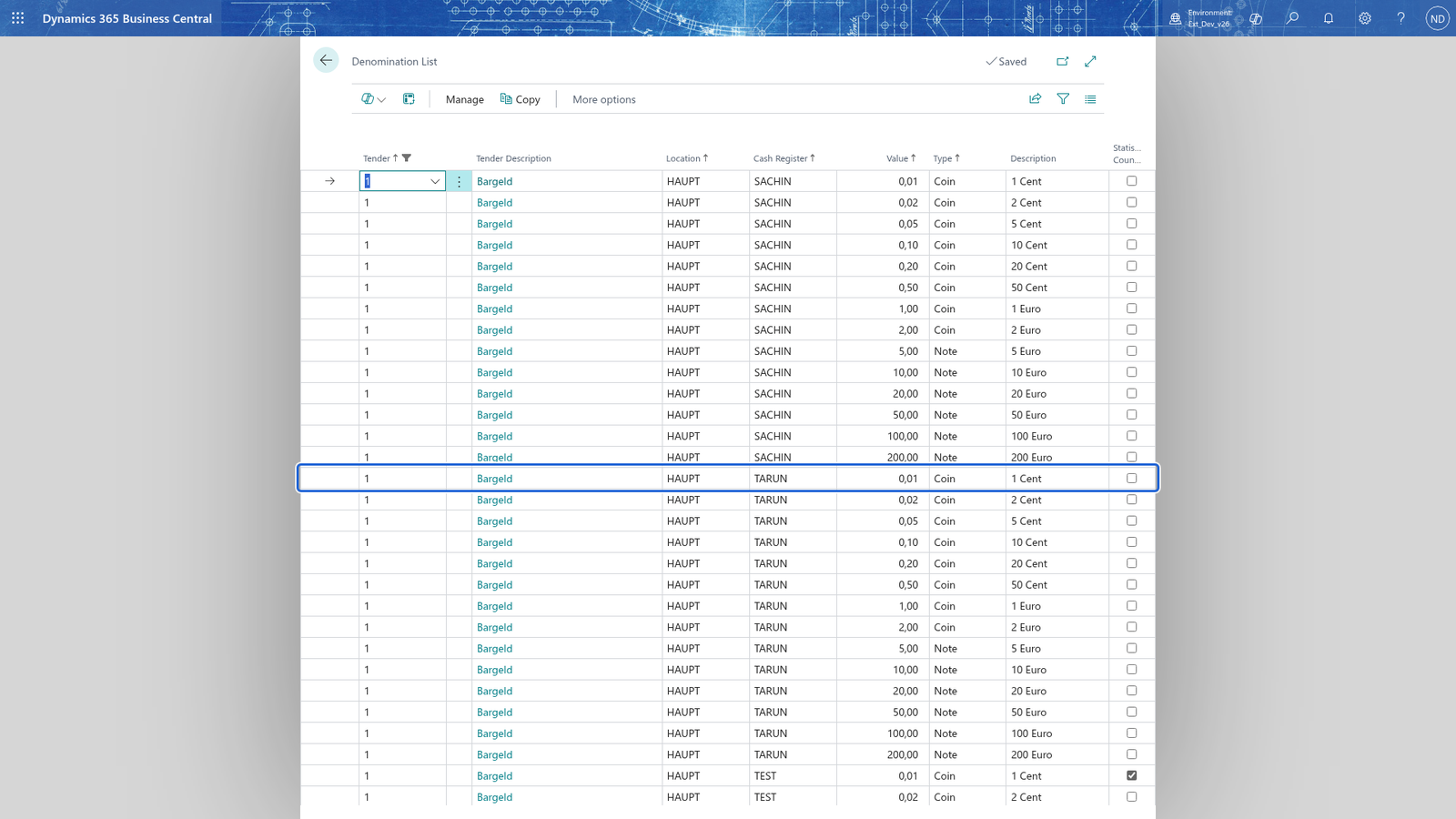
Note: each denomination (value and type) of a tender can be counted at the till, and a denomination with Statistical Counting turned on does not change the cash on hand. The Copy action gives the selected denomination to every other cash register of the location; a register that already has the value is left as it is.
Keep the cash account book accounts
A cash account book account is the reason money moves between the drawer and Business Central: a deposit brought into the till, a payout paid out of the till, or a cash-up taken to the bank. Quick keys and the cash account book at the register let the cashier move money to one of these accounts.
- Search for Cash Account Book Accounts and open it.
- Choose New and enter Code (in the story 01 deposit to the bank and 02 cash-up), Description and Type.
- In G/L Account, choose the account the movement posts to.
- Leave Blocked off so cashiers can use the account; turn it on only when an account must no longer be used.
- Choose Dimensions to give the selected account its own dimension values, and Translation to give the account its names in the languages of the shop.
The the company setup has accounts 01 to 04; 01 is used for the deposit, 02 for the cash-up and 03 for a payout.
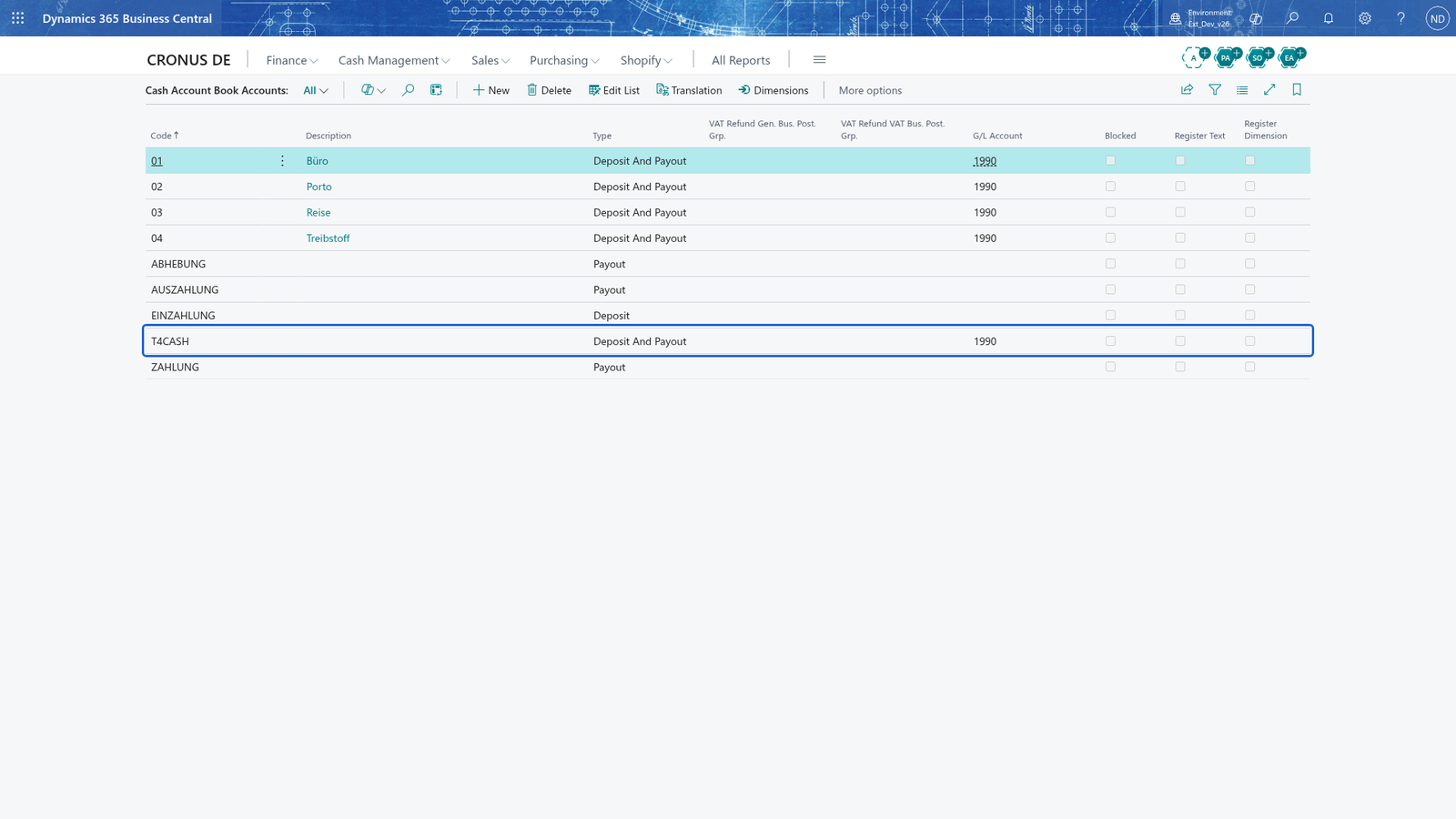
Note: A cash account book account that is used for deposits keeps its G/L Account and is not blocked by the app, so the money of every deposit goes to the same account and nothing stops the deposit.
Look up the counts of the register
Every count of HAUPT/TEST is kept.
- Search for Cash Counting List and open it.
- Filter Cash Register to TEST to see only your register.
- Choose a line to open the Cash Counting card and see the counted lines of that count.
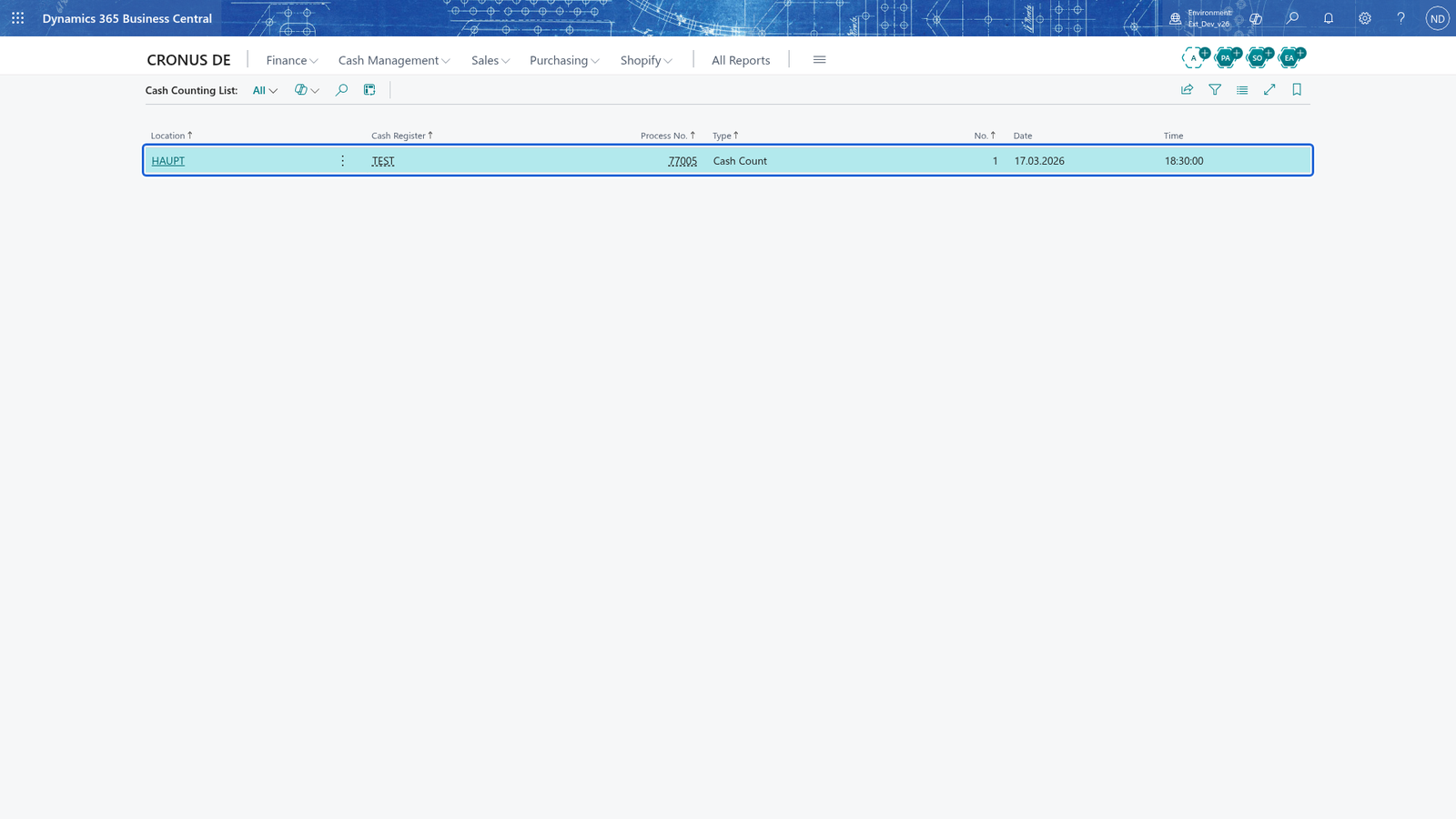
Note: both Cash Counting List and Cash Counting are read-only: a count is kept as it was made and cannot be changed, inserted or deleted there.
What happens
- The count creates a counting header (one per count) with its counted lines, one line per tender and denomination, with the expected amount, the counted amount and the difference.
- A deposit, a payout and a cash-up are kept as cash account book entries on the cash account book accounts you chose (01 deposit, 02 cash-up, 03 payout); a tender transfer moves an amount from one tender of the register to another, and opening the drawer at the till is logged.
- The interim report and the cash count (Kassensturz) print during the day; a cash count also appears as a count in Cash Counting List, where you find the start count, the counts during the day and the close count.
- The closing report prints at the close, and the register returns to the start mode, where the next cashier starts with a new change float.
- The counts stay in Cash Counting List; choose a line to open its Cash Counting card with the counted lines and the difference. The day's sales and payments are analysed in the analysis pages and reports (finance and analytics chapters).
If something goes wrong
- All other cash registers of location HAUPT already have this denomination. - the Copy action only adds denominations that the other registers of the location are missing; this message means the other registers already had the value.
- Copied 1 denomination(s) to the other cash registers of location HAUPT. - this is the confirmation that Copy added the denomination to the other registers of the location; open the other register to check the values.
- A tender you want counted is not among the counted lines. - the count only includes cash by denomination and those tenders whose Use for Counting is turned on in Tenders; turn it on for the tender and count again.
- A cash account book account cannot be used. - Blocked is turned on for the account; turn it off in Cash Account Book Accounts or choose another account.
- A counted line shows a difference that is not 0.00. - the counted amount does not match the expected amount. Count the line again, check the change float and the notes and coins you entered, and count again before you close the register.
- A payout leaves the drawer short. - a payout takes cash out of the till, so the next count shows a smaller cash on hand than the sales expect. Record the payout on the right cash account book account and make sure the amount you paid out is the amount that left the drawer.
- A cash count is refused. - only a seller whose rights allow it can run the cash count (Kassensturz); if the till says the current seller has no right for it, ask a supervisor such as the administrator to run it.
- You are not allowed to open the drawer, or no cash drawer is connected. - only a seller with the right may open the drawer, and a cash drawer must be set up on the device card; ask a supervisor such as the administrator, or connect the drawer there.