
Action suggestions: deleting and anonymizing personal data
When the retention period for a person's data has run out, Business Central must not simply delete the records: the GDPR requires that every record holding that person's data may be deleted or anonymized. The GDPR ToolBox therefore works in two phases. It first proposes, per top-level master data record, deletion or anonymization as an action suggestion; then a person reviews and executes the suggestion. Lena Hartmann works with this list when Tanja Weiss asks for her data to be deleted or when the retention periods set in the table guidelines have passed.
Before you start
- Table guidelines: each table that holds personal data has a guideline with an Action Type (Delete or Anonymize) and an Action Date Formula (for example 5Y for Contact, Customer and Sales Header, and 10Y for Posted Sales Invoice); for posted records, Scheduled Action (Field No.) points to the date the period is counted from (Posting Date on Posted Sales Invoice). See the chapter on table guidelines.
- The data structure (here TENANT: Contact -> Customer -> Contact Business Relation -> Posted Sales Invoice) with relations, filters and field lists, so the app knows which records belong to the same person.
- Scheduled actions exist for the person's records: they are created automatically when the records are created or changed, or from historical data. A suggestion is proposed only when the action date of these scheduled actions has been reached in every record of the structure.
- (Optional) Job queue entries in Business Central (search for Job Queue Entries) for creating and for processing suggestions let the work run unattended; otherwise Lena runs both steps by hand.
Create the suggestions
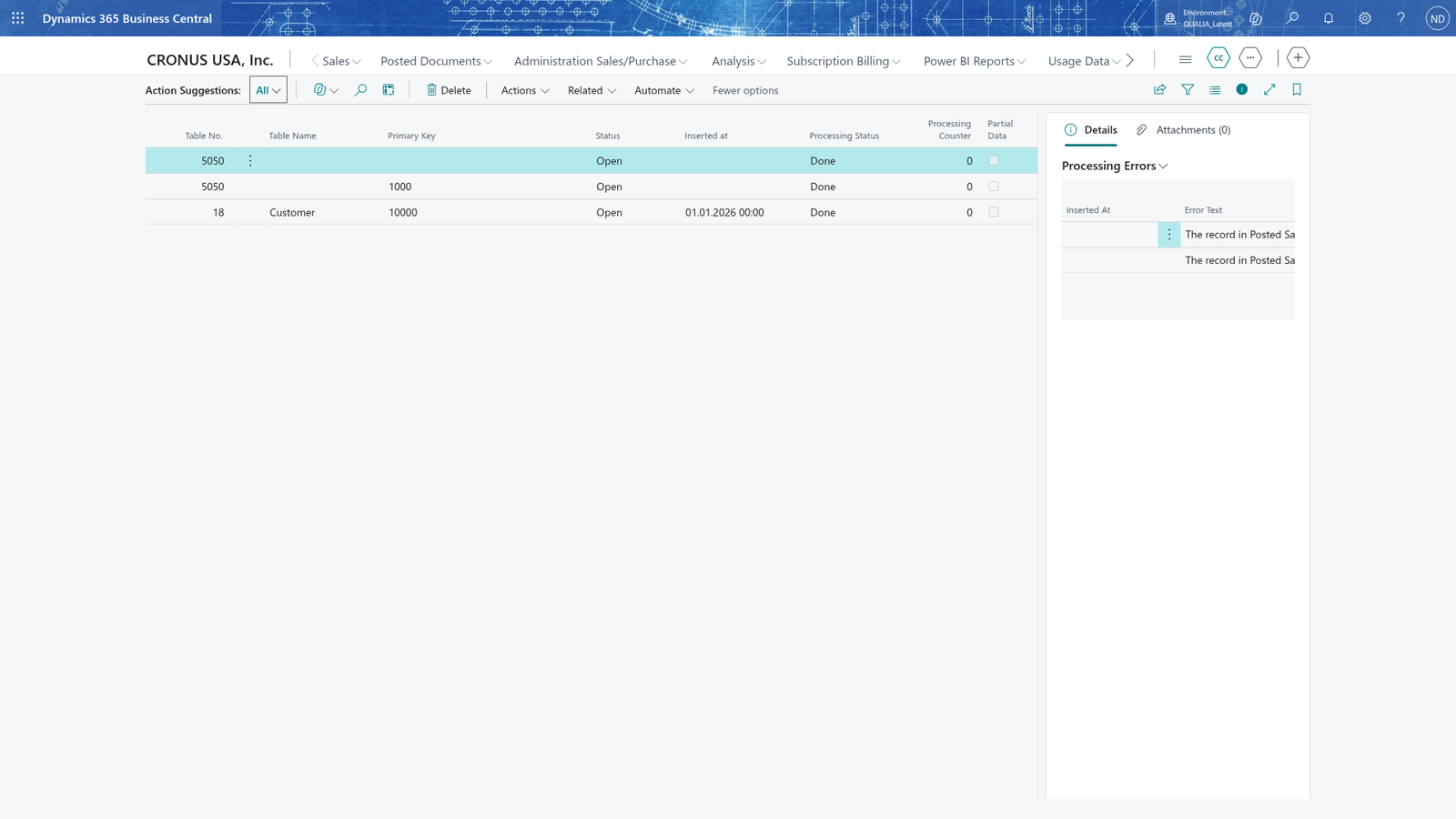
- Choose the search icon, enter Action Suggestions, and open the page (the GDPR role center also links here as Suggested Actions).
- Choose Create Suggestions. The app checks the scheduled action entries that have not been processed yet, collects the related records through the data structure, and proposes the top-level master data record.
An entry is proposed as Status Suggested with Processing Status Not processed; the suggestion names the table and record, so you can see which person it is about.
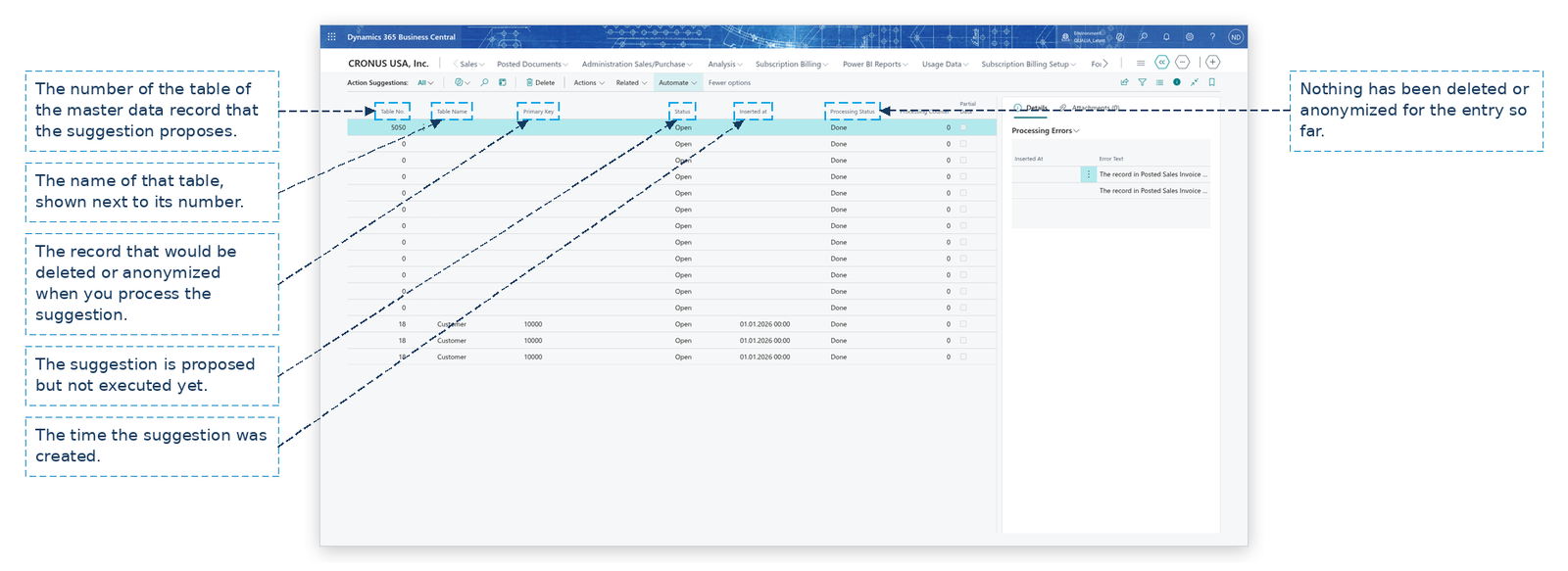
Note: A suggestion is created only when the action date has been reached in every record of the structure; otherwise the record stays a plain scheduled action and is proposed on a later run. That is why the app never deletes a customer whose tenancy invoice is still inside its retention period.
Review and process a suggestion
The app never deletes anything while creating suggestions: the actual deletion or anonymization happens when you execute them, by hand or by the process-suggestions job queue.
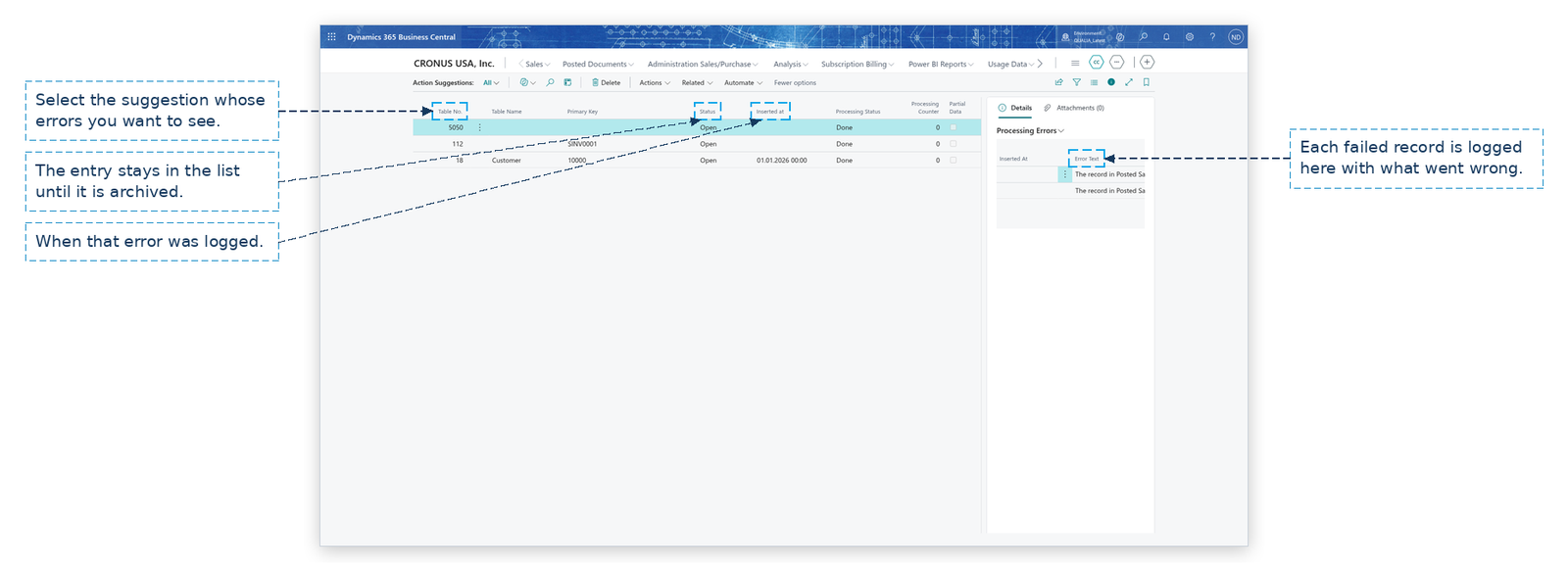
- Select the suggestion line.
- Choose View Personal Data and check in the personal data view whether every related record may be removed (one line per table, with the scheduled action date).
- Choose Delete and anonymize to execute the selected suggestion: the app deletes the records whose guideline says Delete and overwrites the personal fields of Anonymize records with anonymizing values. To process every released suggestion at once, choose Delete and anonymize all Entries.
- If a related record must be kept for the moment, choose Reschedule instead and enter a new date and a reschedule reason (for example DELAY, "Customer delay") for the data set.
- Select a processed line and read the Error Text in the Processing Errors FactBox: an entry is never stopped silently.
Note: Check suggestions before you process them: Delete and anonymize deletes records from the database for the whole structure of the master data record, and Business Central does not offer an undo for it.
Find processed suggestions in the archive
- On the Action Suggestions list, choose Suggestion Archive.
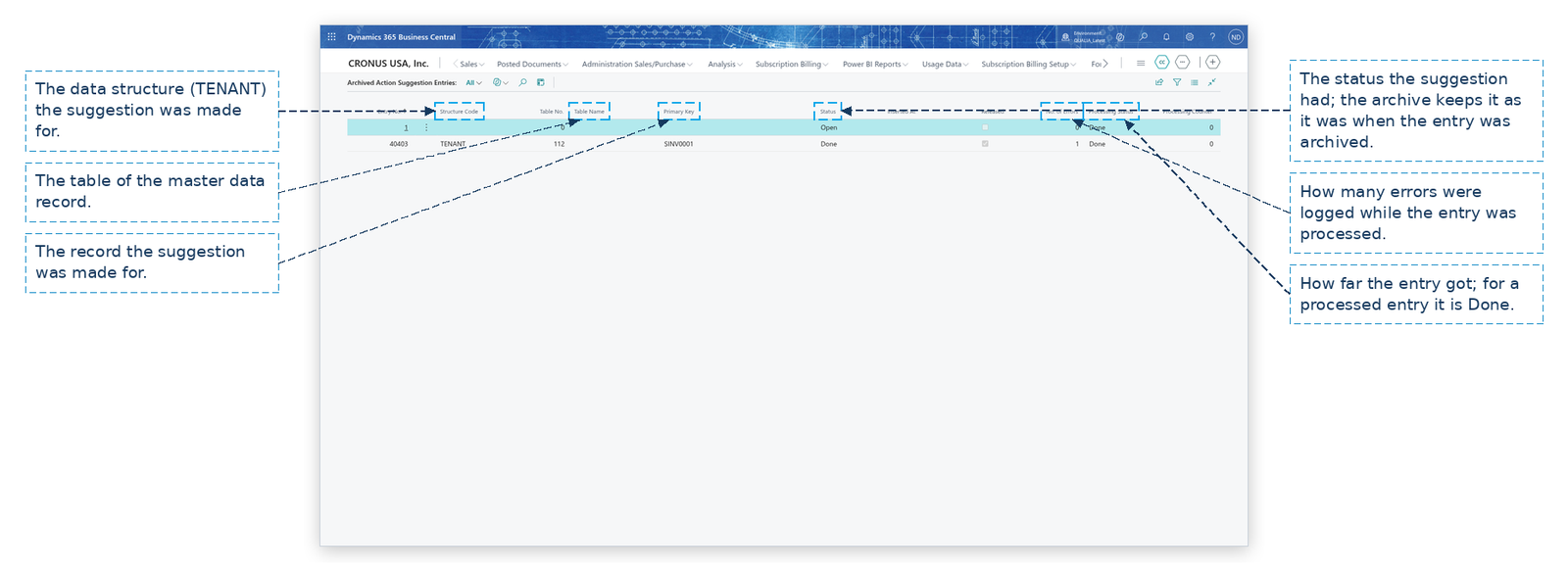
- The list shows every processed entry with its Structure Code, table, Primary Key, Status, Released flag, No. of Errors and Processing Status.
- Run Archive Done Actions on the Action Suggestions list once after an update from an older version of the app; suggestions that have been processed are archived automatically, so the Action Suggestions list does not fill up.
Example: Tanja Weiss is deleted at QUALIA Technik
Tanja Weiss (Contact 1000, the contact person of the tenant Mietwerke Berlin GmbH, Customer 2000) asks Lena Hartmann to have her data deleted. The records belong together through the data structure TENANT: the contact, the customer, the contact business relation and the posted sales invoice SINV0001.
- Lena opens Action Suggestions and chooses Create Suggestions. The app checks the unchecked scheduled action entries of Tanja Weiss: the action date is passed for the contact, the customer and the invoice, so the contact Tanja Weiss (No. 1000) is proposed as an action suggestion entry (Table Name Contact, Primary Key Contact 1000, Status Suggested, Processing Status Not processed). The app leaves Contact 1001 (Peter Kraus) out: no action date of his records is reached, so the suggestion list does not get a line for him.
- Lena selects the line and chooses View Personal Data to confirm that every record of the structure is ready.
- Lena chooses Delete and anonymize. The app works on the whole structure of the master data record:
| Record | Table guideline | Result |
|---|---|---|
| Contact 1000 Tanja Weiss | Contact: Delete | record deleted |
| Customer 2000 Mietwerke Berlin GmbH | Customer: Delete | record deleted |
| Posted Sales Invoice SINV0001 | Posted Sales Invoice: Anonymize | Bill-to Name and Phone No. overwritten with anonymizing values |
The record that could not be removed is the invoice SINV0001: its guideline Posted Sales Invoice has the Execute Delete Trigger flag, so when the app processes the invoice it calls the invoice's delete trigger, and that trigger refused to remove the record. The app logged "The record in Posted Sales Invoice cannot be deleted" in Processing Errors and continued with the rest of the structure, so Contact 1000 and Customer 2000 are deleted as the table shows. The error stays in the Processing Errors FactBox as long as the entry is in the Action Suggestions list, and the archive keeps the entry with its No. of Errors.
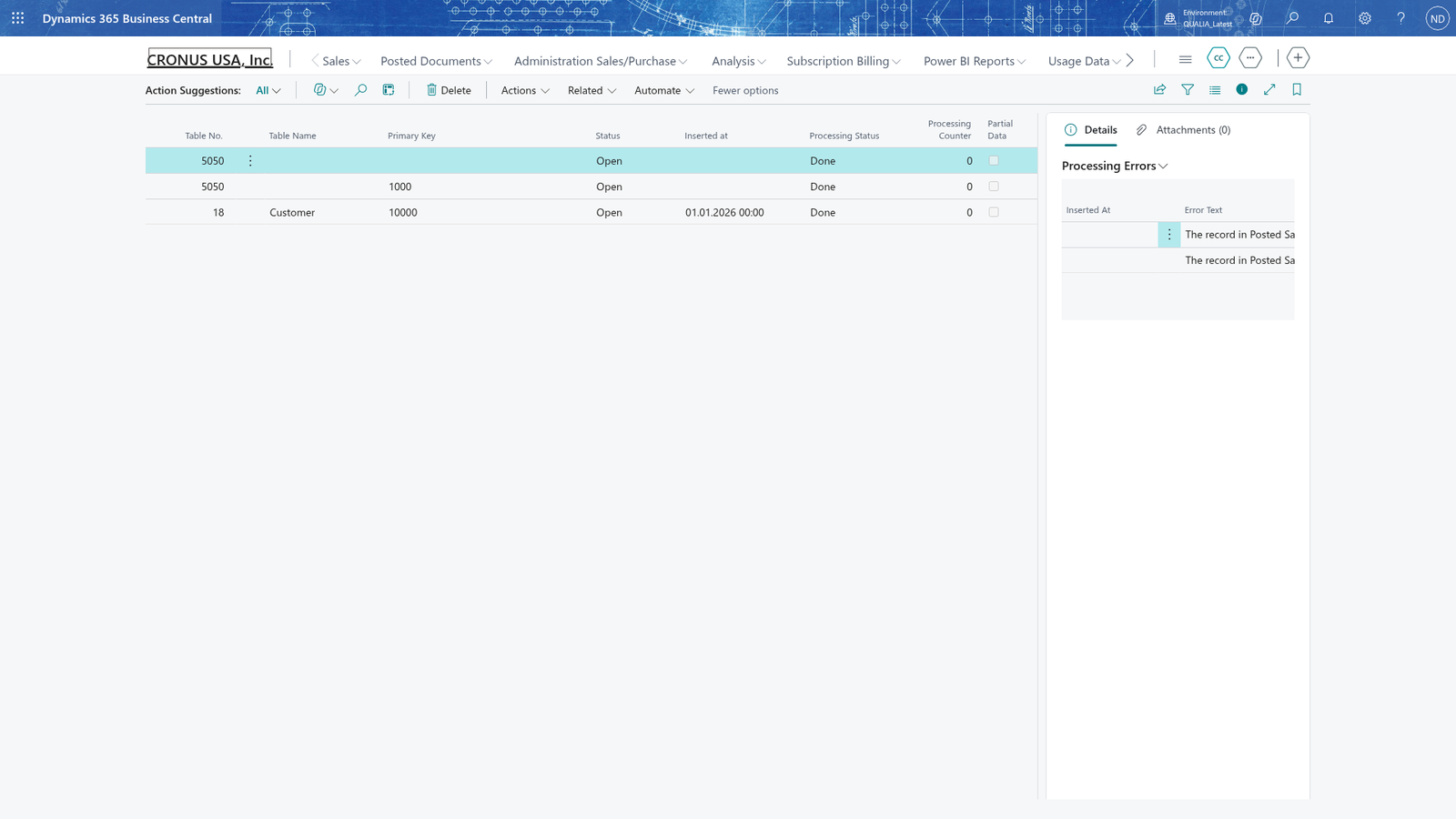 4. Lena opens Suggestion Archive: the processed entry is there with Processing Status Done and No. of Errors 1, the refused invoice. She runs Archive Done Actions once for suggestions that were still waiting from the earlier app version.
What happens
- Action Suggestions (search, or Suggested Actions on the GDPR role center) holds the proposals with their status, processing status and, in the Processing Errors FactBox, the errors of processing.
- Executed entries are moved to the archive automatically; Suggestion Archive lists them, so you can later show that data was deleted or anonymized on time.
- Check: open Action Suggestions after each run, and open Suggestion Archive to look up a processed entry; the Suggested Actions link on the role center opens the same list.
- Corrections: an entry that failed stays in the Action Suggestions list until it is processed again; the archive keeps its No. of Errors.
If something goes wrong
- "There are no scheduled actions with an action date today or earlier, so there is nothing to suggest.": none of the waiting scheduled action entries has reached its action date, so there is nothing to propose. Wait until the dates are reached, or reschedule the scheduled actions, and run Create Suggestions again (the job queue does it for you if it is set up).
- An entry is not proposed although its own action date has passed: a related record in the structure is not reached yet - a suggestion is proposed only when the action date has been reached in every record of the structure. Check the other records' scheduled action dates in the personal data view; if one of them must be kept for the moment, use Reschedule with a new date and a reschedule reason.
- The Processing Errors FactBox lists an error about a record that could not be deleted, for example "The record in Posted Sales Invoice cannot be deleted": the delete trigger of that table refused the removal. Read the Error Text to see which record and what went wrong, find the record (e.g. in Posted Sales Invoices), resolve what blocks the deletion, and process the suggestion again.
- A suggestion you did not want yet is listed: do not process it. It changes nothing in the data; Create Suggestions only proposes, and you decide when, or whether, to run Delete and anonymize.